ESP32 Wi-Fi HaLow Module with 2MP Camera | 32Mbps High Speed | Long-distance transmission-915MHz
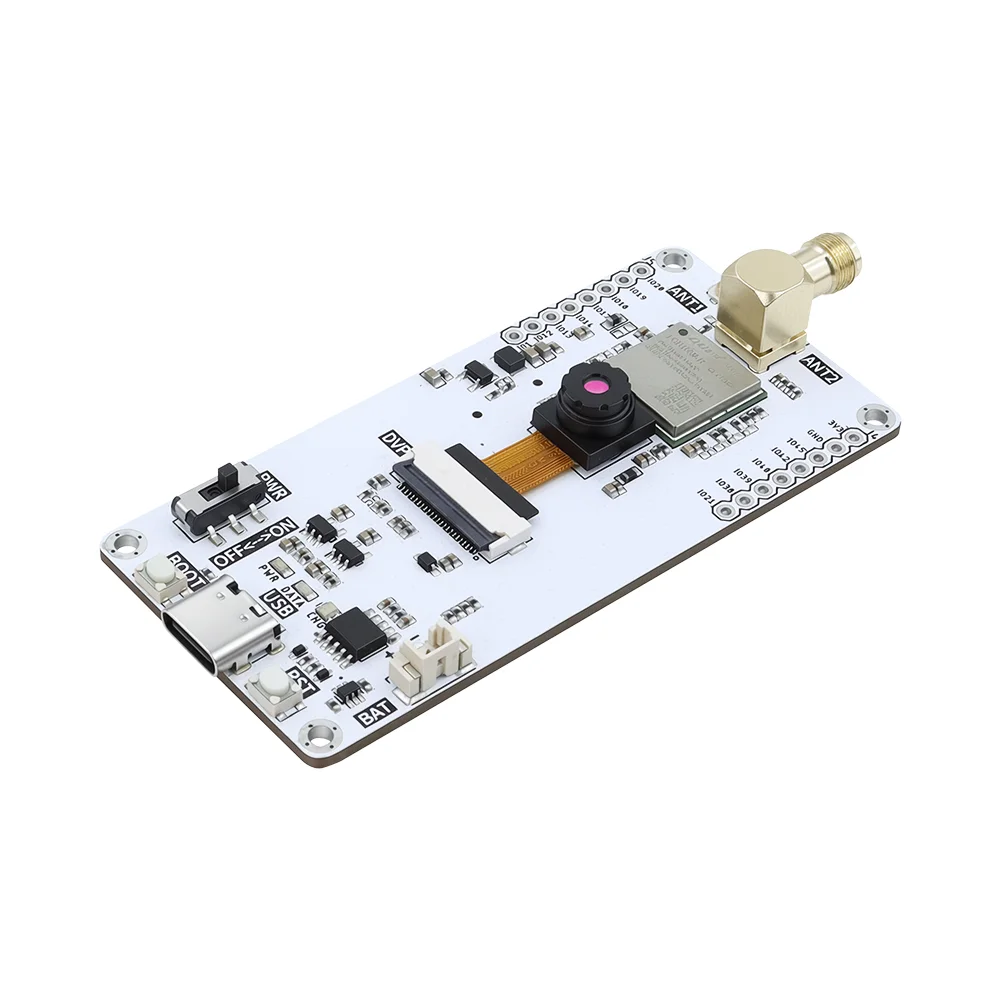
Hardware Overview


Power / Indicators
- Power Indicator (red): Solid ON when powered; OFF when power is disconnected.
- Data Indicator (blue): Blinks during data transmission; remains OFF when idle.
- Charging Indicator: Red when charging; green when fully charged.
Controls
- Toggle Switch: Slide upward to power on the device; slide downward to power off.
- Reset Button: Press once to reboot the device.
- BOOT Button: Press while rebooting to enter programming mode.
Pin Description::
CSI / Camera Pin Mapping (ESP32 DVP Interface)
| Signal Name | GPIO Pin | Description |
|---|---|---|
| XCLK | 47 | External clock output (XCLK) for camera module |
| SCCB_SDA | 45 | I2C data line (camera register control) |
| SCCB_SCL | 42 | I2C clock line (camera register control) |
| D0 | 17 | Parallel data bit 0 |
| D1 | 13 | Parallel data bit 1 |
| D2 | 12 | Parallel data bit 2 |
| D3 | 14 | Parallel data bit 3 |
| D4 | 18 | Parallel data bit 4 |
| D5 | 46 | Parallel data bit 5 |
| D6 | 48 | Parallel data bit 6 |
| D7 | 38 | Parallel data bit 7 |
| VSYNC | 40 | Frame synchronization signal |
| HREF | 39 | Line synchronization signal |
| PCLK | 21 | Pixel clock |
| PWDN | -1 | Power-down pin (not used) |
| RESET | -1 | Reset pin (not used) |
SD card:
SD_MOSI----IO11
SD_CLK ----IO15
SD_MISO----IO16 SD_CS ----IO10
bat:
2-pin MX1.25mm connector interface.
output pin:
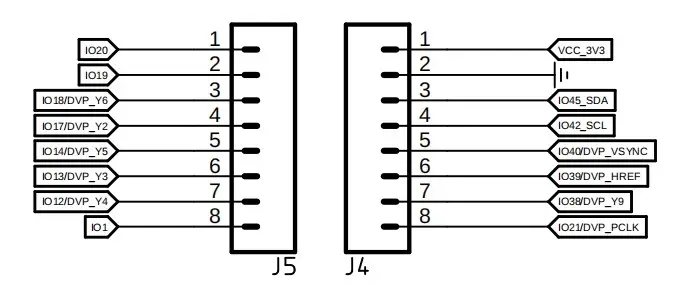
Note: Most of the pins listed here are multipurpose; only the I2C pins and IO20 and IO19 are available for use. Pin 1 is pulled low and cannot be used.
Platforms Supported
| ESP-IDF |
|---|
 |
 |
Example video:
MQTT Video Streaming with Elecrow ESP32 Wi-Fi HaLow Module
Resources
Github link:
(This GitHub link usually may contain program code, factory firmware, factory sourcecode and other materials. Please click to view.)
How to buy
Please visit this page to purchase ESP32 Wi-Fi HaLow Module with 2MP Camera.
Support
If you encounter any issues while using the service, you can contact us via the social media links in the bottom-right corner of elecrow or send an email to techsupport@elecrow.com for technical support.