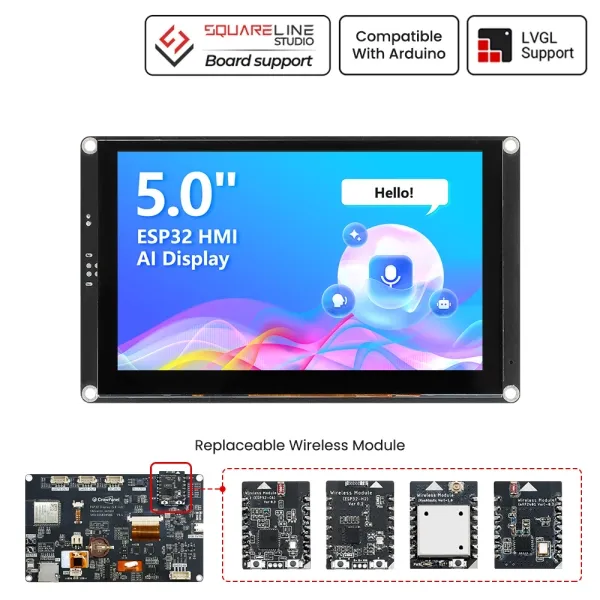
CrowPanel Advance 5.0-HMI ESP32 AI Display
Model DIS02050A
Version 1.0
Pin Output:
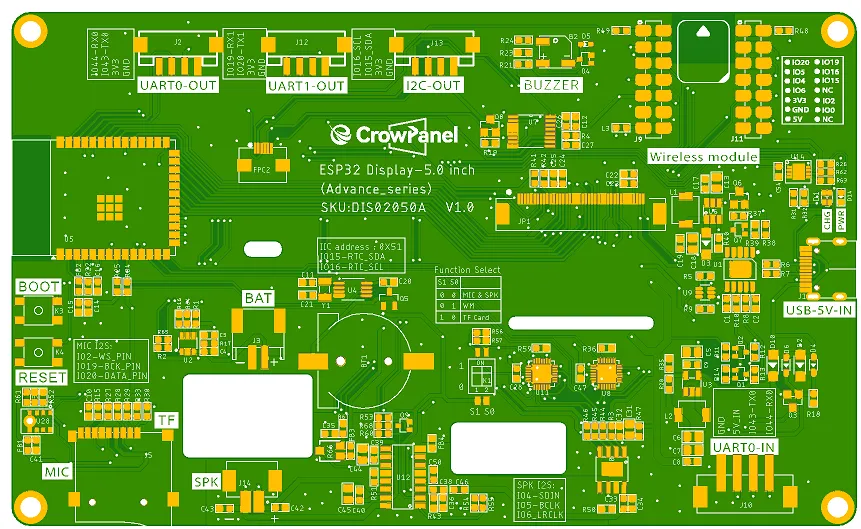
Functional description
Functional description of the product's internal interfaces:
| Pin Name | Description | Connector Type |
|---|---|---|
| SPK | Output audio signals to connect to speakers. The main board comes with a power amplifier chip circuit. | PH2.0-2P |
| PWR | Power LED. | |
| RST | Reset button. Press it to reset the system. | |
| boot | ||
| UART0-OUT | Builds communication between Logic modules, including the serial communication module and the print module. | HY2.0-4P |
| UART1-OUT | Builds communication between Logic modules, including the serial communication module and the print module. | HY2.0-4P |
| UART0-IN | 32 KB (ATmega328) of which 0.5 KB used by bootloader | XH2.54-4P |
| I2C-OUT | Establish communication between the microcontroller and peripheral devices. | HY2.0-4P |
| BAT | Connect the lithium battery. (with battery charging circuit)(3.7v-4.2v) | PH2.0-2P |
Product External Interface Functions:
| 5.0-inch HMI port | pin number | Electrical Characteristics |
|---|---|---|
| UART0-OUT | RX(IO44); TX(IO43) RX; | Output voltage: 3.3V Output current: 1A max. Use: Power supply output and communication. |
| UART1-OUT | RX(IO19); TX(IO20) RX; | Output voltage: 3.3V Output current: 1A max. Use: Power supply output and communication. |
| UART0-IN | RX(IO44); TX(IO43) RX; | Input voltage: 5V ± 5%. 5.5V max. Input current: 2A max. Purpose: Power supply input and communication. |
| I2C | SDA(IO15); SCL(IO16) ; | Output voltage: 3.3V Output current: 1A max. Use: Power supply output and communication. |
| SPK | I2S_LRCLK(IO6);I2S_BCLK(IO5);I2S_SDIN(IO4); | Maximum output current: 20mA Signal type: 3.3V logic level, digital control signal |
| SD Card Slot | MOSI(IO6); MISO(IO4); CLK(IO5); CS(3.3V) | Maximum output current: 20mA Signal type: 3.3V logic level, digital control signal |
| LCD Backlight | PCA9557PW-IO1 | Maximum output current: 20mA Signal type: 3.3V logic level, digital control signal |
| I2S MIC | MIC_SD(IO20);MIC_WS(IO2);MIC_CLK(IO19) | Maximum output current: 20mA Signal type: 3.3V logic level, digital control signal |
| BUZZER | IO8 | Maximum output current: 20mA Signal type: 3.3V logic level, digital control signal |
Schematic:
ESP32-S3 and ISP Display Wiring Pins:

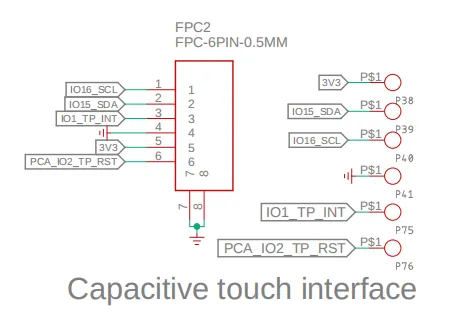
ESP32-S3 and Touch Driver Wiring:
i2c address: 0x5D.
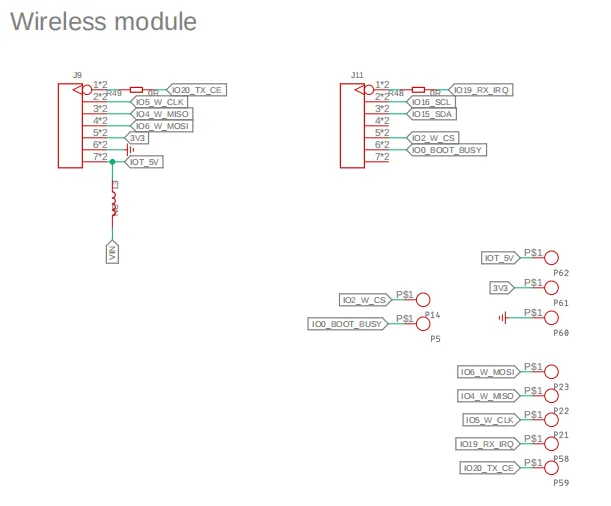
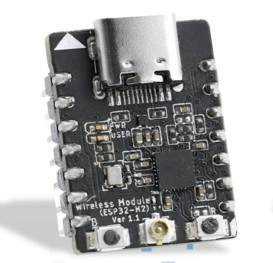
ESP32-S3 and wireless module wiring pins:
Schematic diagram of function selection:
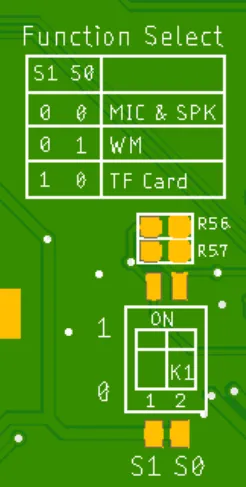
Switching Function Keys:
| S1 | S0 | effective function |
|---|---|---|
| 0 | 0 | MIC&SPK |
| 0 | 1 | WM(wireless module) |
| 1 | 0 | TF Card |
Version 1.1
Pin Output:
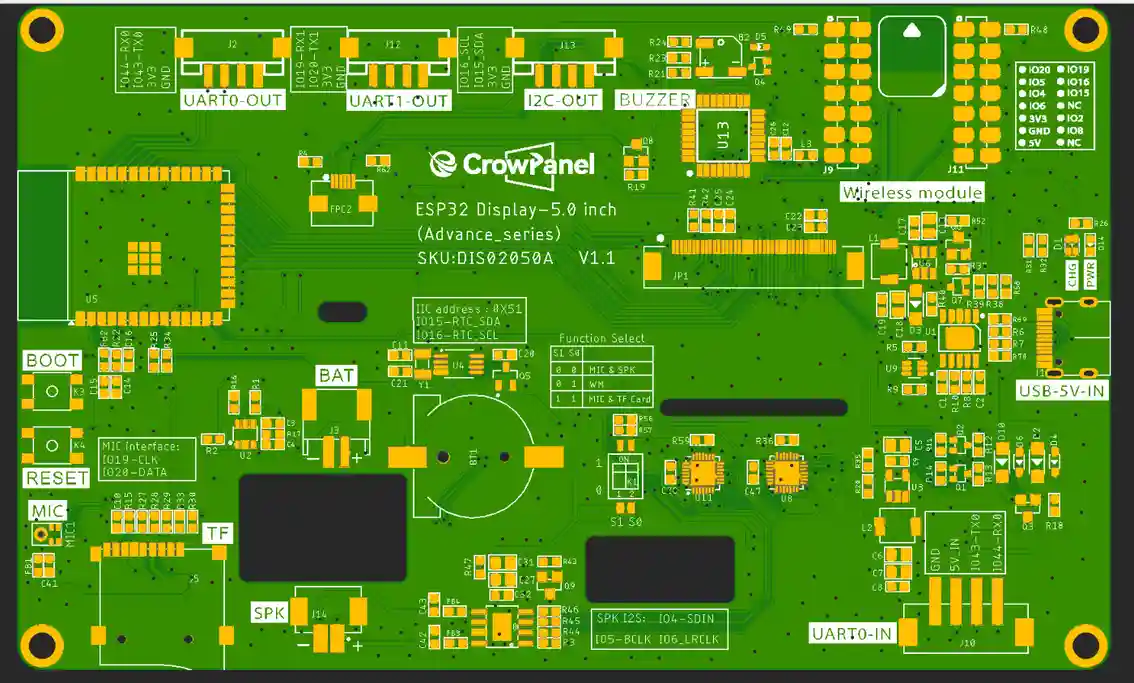
| 5.0-inch HMI port | pin number | Electrical Characteristics |
|---|---|---|
| UART0-OUT | RX(IO44); TX(IO43) RX; | Output voltage: 3.3V Output current: 1A max. Use: Power supply output and communication. |
| UART1-OUT | RX(IO19); TX(IO20) RX; | Output voltage: 3.3V Output current: 1A max. Use: Power supply output and communication. |
| UART0-IN | RX(IO44); TX(IO43) RX; | Input voltage: 5V ± 5%. 5.5V max. Input current: 2A max. Purpose: Power supply input and communication. |
| I2C | SDA(IO15); SCL(IO16) ; | Output voltage: 3.3V Output current: 1A max. Use: Power supply output and communication. |
| SPK | I2S_LRCLK(IO6);I2S_BCLK(IO5);I2S_SDIN(IO4); | Maximum output current: 20mA Signal type: 3.3V logic level, digital control signal |
| SD Card Slot | MOSI(IO6); MISO(IO4); CLK(IO5); CS(3.3V) | Maximum output current: 20mA Signal type: 3.3V logic level, digital control signal |
| LCD Backlight | P3.5(STC8H1K28) | Maximum output current: 20mA Signal type: 3.3V logic level, digital control signal |
| Backlight Adjustment | P1.1(STC8H1K28) | |
| I2S MIC | MIC_SD(IO20);MIC_WS(IO2);MIC_CLK(IO19) | Maximum output current: 20mA Signal type: 3.3V logic level, digital control signal |
| BUZZER | P2.7(STC8H1K28) | Maximum output current: 20mA Signal type: 3.3V logic level, digital control signal |
| TP_RST | P1.7(STC8H1K28) |
Switching Function Keys:
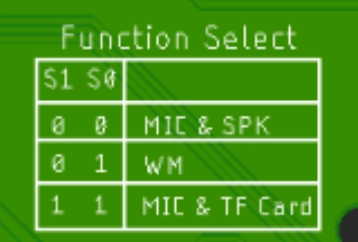
| S1 | S0 | effective function |
|---|---|---|
| 0 | 0 | MIC&SPK |
| 0 | 1 | WM(wireless module) |
| 1 | 1 | MIC&TF Card |
ESP32-S3 and wireless module wiring pins:
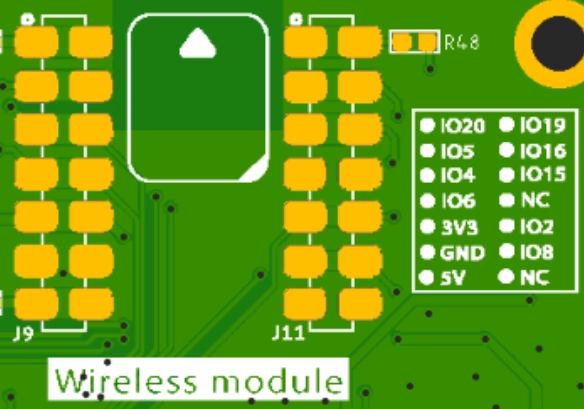
Schematic:
ESP32-S3 and ISP Display Wiring Pins:
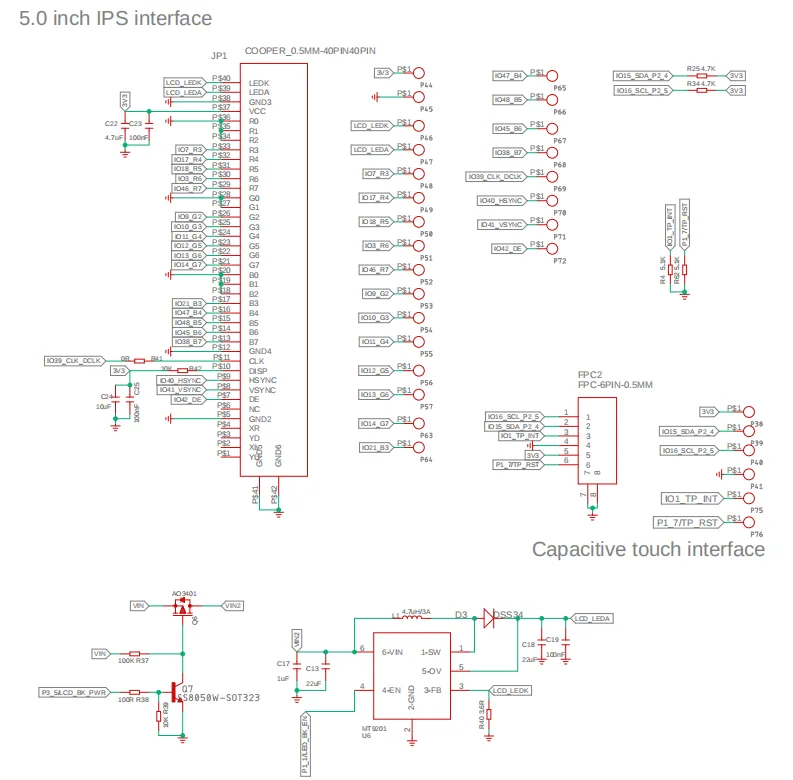
ESP32-S3 and Touch Driver Wiring:
i2c address: 0x5D.

Version update points:
Version 1.1:
① Version 1.1 updated the control of backlight on the basis of the original, the backlight of version 1.1 is controlled by STC8H1K28 microcontroller, and the backlight is lit in the program by sending the value to this microcontroller address (0x30). The values are 0x05, 0x06, 0x07, 0x08, 0x09 and 0x10, where 0x05 switches off the backlight and 0x10 is the maximum brightness.
**To set a different brightness level, you must first send 0x10 to turn on the screen, and then send another value to adjust the brightness. **
The buzzer and speaker operate on the same principle as the backlight control: sending 0x15 activates the buzzer, while sending 0x16 turns it off. Sending 0x17 turns the speaker on, and sending 0x18 turns it off.
② Version 1.1has a new option for function switching, see above for details.
Version 1.2:
Version 1.2 introduces an updated backlight control function. In this iteration, the backlight is managed by the STC8H1K28 microcontroller. The programme illuminates the backlight by transmitting numerical values to the microcontroller's address (0x30). Brightness adjustment spans 0-245 levels, where 0 denotes maximum brightness, 244 represents minimum brightness, and 245 disables the backlight.
The buzzer and speaker operate on the same principle as the backlight control: sending 246 activates the buzzer, while sending 247 turns it off. Sending 248 turns the speaker on, and sending 249 turns it off.
Version 1.2: Other hardware and pin configurations remain unchanged. The button components have been updated; the buttons are now shorter, and the casing has been modified accordingly.
Version 1.3:
Optimizations have been made, and the I/O pins remain the same as in the previous version.
Platforms Supported



| ESPHome | SquareLine Studio | Meshtastic |
|---|---|---|
 |  |  |
| ESPHome View Tutorials -- V1.0 ESPHome View Tutorials -- V1.1/V1.2/V1.3 | SquareLine Studio View Tutorials -- V1.0 SquareLine Studio View Tutorials -- V1.1/1.2/V1.3 | Meshtastic View Tutorials Only version 1.0 supports Meshtastic. |
| Thread Wireless | ESP-matter |
|---|---|
 | |
 | |
Resources
Github link:
(This GitHub link usually may contain 3D files, schematics, program code, factory firmware, factory sourcecode and other materials. Please click to view.)
Code lib link:
Wireless link:
How to buy
Please visit this page to purchase ESP32 Display-5.0 inch(Advance_Series).
Support
If you have any problem about how to use it, you can connect to us at the bottom-right of bazzer or contact to techsupport@elecrow.com to get technology support.